Archive for the ‘Programming’ Category

From an old PIC microcontroller to Arduino

September 2, 2025

In December 2001 I soldered 25 red LEDs and 5 resistors onto a square of veroboard:

then connected a locally produced PIC16F84 microcontroller development board via ribbon cable soldered to the veroboard, and a home-made power supply to it, wrote C code to create frames of patterns that changed over time, and used it as a Christmas decoration. It has been up each Christmas and New Year for the past 24 years at Christmas and New Year. The video below shows some of the patterns it has displayed.

Each time the code (or even just patterns) changed, the PIC microcontroller had to be removed from the development board, inserted into a programming board, and the binary (.hex format) including code and static data (e.g. pattern frames) uploaded to the device via a serial connection to the programmer board, then placed back into the development board .

I’ve used quite a few programmers over the years, starting with a parallel port programmer I built from a kit in conjunction with free software to write, read and verify bits written to the microcontroller. After parallel ports went the way of the dinosaur, and before USB ports were common, serial port pins were used to “bit bang” data to the microcontroller via a PIC pin, one bit at a time. Over time, serial ports became extinct too, and a USB to serial cable did not work as a replacement because the wires over which to bit bang data were absent. So, I kept an old Windows 95 laptop around for this purpose, since it still had serial port.

Compiled files (.hex files) had to be transferred to the laptop via a USB memory stick from one of a number of computers I used to write and compile the code on (Windows, Mac). Over time the C compiler had to change as well, from Hi-Tech to MPLAB.

I figured that one day the Windows 95 laptop was going to stop working or I would lose the only USB stick that worked with it.

So, in December last year (2024) I finally decided to change the microcontroller from a PIC 16F64 to an AVR based Arduino which has a cross-platform development environment and allows code to be read/written via a USB cable. That’s been the case for a decade or more now for many microcontroller and similar devices.

Although the General Purpose Input/Output (GPIO) pins changed, just 3 lines of the original C code had to be changed to get it to work with the Arduino! That’s is a testament to C. Had it been written in PIC assembly code (and I’ve written my share of machine-level code) or some now extinct special purpose language, or a compiler that’s no longer available or supported (or only on one operating system), a total rewrite would have been necessary.

To me, microcontrollers are like what microcomputers were 40 to 50 years ago, but with no operating system, except perhaps a bit of code that loads other code into a device. Early microcomputers (e.g. Apple I or II, TRS-80, Commodore Vic-20/64) didn’t have much of an operating system either. They just booted up into a read-eval-print loop (REPL) and called other code to load programs from tape or disk, display characters on the screen, play sounds and so on, often supported by specialised hardware.

The Arduino platform provides common pinouts irrespective of processor (e.g. AVR, ARM), a platform independent Integrated Development Environment (IDE), C++ as the development language, a common Application Programming Interface (API), a library of common code for many peripheral devices (e.g. keypads, LCDs), and a USB to serial programming and I/O route.

Before the Arduino, it was the wild west, like it was before the PC and Mac came to dominate. That diversity was interesting however, and 20 years ago I tried my hand at writing generic library code that was likely to work with multiple microcontrollers, and experimented with writing compilers (and interpreters) for various languages to run on microcontrollers. Starting from scratch is not necessary now.

The PIC16F84 had less than 100 bytes of RAM and less than 2K of non-volatile program (FLASH storage) and could run at between 4 and 10 MHz. I later replaced the PIC16F84 with the PIC16F628 which had more than 200 bytes of RAM, 3.5K of FLASH and had a clock speed of 20 MHz.

Optimising the code and patterns that were stored mattered a lot on these small devices!

Compare this with the AVR ATMega 328P used on the Arduino I switched to. It has 32K of program FLASH and 2K of RAM, although the clock speed is only 16 to 20 MHz. Still small by the standards of many microcontrollers now and orders of magnitude smaller when compared to the resources available on even the most modest laptop or smartphone today.

The AVR was made by ATMEL, which was eventually acquired by Microchip, maker of PIC microcontrollers, ironic because of the fierce rivalry between the two companies at one point, amusingly exemplified by this sticker:

The processor, clock speed, memory and on board peripherals in microcontrollers have improved significantly over time, and devices like the RPi PICO have more powerful processors (typically ARM based) and can be programmed either as an Arduino device or can run MicroPython, making it much easier to create more complex gadgets. But that’s for another post.

There’s a lot that can be explored in the world of microcontrollers, which are distinct from other small devices such as Raspberry Pi, NVIDIA Jetson, Beagle in at least one important way. The latter are full fledged computers that run an operating system, typically a variant of Linux.

Unless a microcontroller is running an interpreter, the code you write takes over the device completely. There may be a small boot-loader that loads the program to be run, but nothing like an operating system. Ultimately, when you program a microcontroller, the only code running is yours, compiled or assembled from a human-readable language into machine code. You control the vertical and the horizontal. If the device does nothing or if it does the wrong thing, it’s because there’s an error in your code or you wired something up incorrectly. Either way, it’s on you.

When I started writing for the PIC, it really was entirely my code, nothing I had not written myself vs use of Arduino library code. In the case of this simple LED grid, it still is all my code. Either way, this complete control over a device is appealing in an age of bloated operating systems, an enormous emphasis upon cybersecurity, and wasted power.

Microcontrollers are also an example of so-called green computing. There is an emphasis on low power consumption and small footprint.

That’s a topic worth exploring more in an age of Blockchain and more recently, Large Language Models. For example, some machine learning models can be trained on a more powerful computer, then run on a less power hungry microcontroller.

Another topic worth exploring is zero-instruction set computing.

So many things to write about.
On the N Days Of Christmas, part 8

January 12, 2025

My last post ended with the strong hint that I may not have been finished with this topic.

In part 4, triangular numbers were used as a first simplification to computing the total number of gifts for the 12 days of Christmas by eliminating some additions.

It turns out that the polynomial from part 5 is the equation for the class of tetrahedral numbers.

I wanted to determine the optimal solution from first principles and experimentation. The triangular numbers link was found through serendipity (listening to an unrelated podcast). I learned about tetrahedral numbers through further reading after finishing part 7.

In a Wikipedia article about the 12 days of Christmas song, Donald Knuth’s analysis of computational complexity is mentioned and then as an afterthought:

Incidentally, it is also observed that the total number of gifts after m days equals m3 / 6 + m2 / 2 + m / 3.

which is the polynomial we saw from part 5.

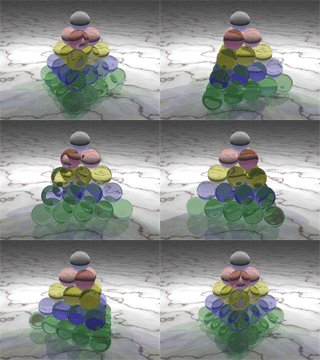
One thing led to another and I came across another Wikipedia page about tetrahedral numbers that are computed with this function. The name of the class of numbers arises from the fact that such numbers can be modelled by stacking spherical balls into a tetrahedron, as illustrated with this nice 3D graphic:

The number of balls in each layer is a triangular number. The number of balls in the tetrahedron is the nth tetrahedral number, and also the number of gifts for the nth day of Christmas.

gifts-for-day-of-xmasn = 1 ball in layer1 + 3 balls in layer2 + 6 balls in layer3 + … + n(n+1)/2 balls in layern

There is also a relationship to the problem of finding the optimal way to stack canon balls worked on by Johannes Kepler (one of my heroes, who realised that planetary orbits are elliptical, not circular), but that’s a different post.

Here are some other interesting things I found along the way:

  • The year that most of the thought went into my posts was 2024, which turns out to be the 22nd tetrahedral number.
  • Ian Phillipps won an Obfuscated C competition in 1988 with a C program that generates the text of the 12 days of Christmas song. The code was described by the judges as “…like what you would get by pounding on the keys of an old typewriter at random”, and as the same Wikipedia article goes on to say: “…takes advantage of the recursive structure of the song to print its lyrics with code that is shorter than the lyrics themselves.”
  • There’s a proof by induction for the tetrahedral numbers for all n that uses the equation for triangular numbers in the inductive step. This deserves further discussion, and perhaps I will return to this from another viewpoint in future.
  • The nth tetrahedral number is represented by the 3rd rising factorial of n divided by the factorial of 3. This yields a slightly more compact equation than the polynomial, but is just another way of expressing it, so is no better computationally. The equality-related expressions below partially recapitulate the explorations throughout this series of posts, with the rising factorial form at right (source: Wikipedia).
  • The 4th diagonal of Pascal’s triangle (built from binomial coefficients) contains the tetrahedral numbers (from left or right). The triangular numbers are in the 3rd diagonal, and the counting numbers are in the 2nd diagonal.

source: https://sahilmohnani.wordpress.com/2013/02/23/pascals-triangle-cubic-quartic-and-sextic-numbers/

It seems that the avenues down which one could stroll in relation to this topic are never-ending.

I can’t promise not to ever return to it, but it’s time to move on I think, at least for now.

On the N Days Of Christmas, part 5

March 10, 2024

Sometimes, you need to visualise data to understand it.

Here is a plot of the number of days vs the total number of gifts, ending with our favourite, traditional data point: 12 days vs 364 total gifts.

Drawing a straight line through these data points isn’t possible, so the relationship between days and total gifts is not linear. There’s clear upward curvature.

What we need to do is create a model of the data.

A first reasonable thought is that the data may represent exponential growth, something we’ve all become accustomed to in the age of COVID. That turns out not to be the case here, as a little reflection will show; there is not a pattern of doubling or tripling, except for the first few days.

There are numerous models we could use, some more complex than others, but to cut a long story short, a polynomial model turns out to fit the data best. Perfectly, in fact. In particular, the model is a so-called polynomial of degree 3.

But I’m getting slightly ahead of myself.

Spreadsheets like Excel, Numbers, and LibreOffice allow a plot and model to be created, much like the ones above, for which I used the R programming language. Here’s what this looks like in Excel:

There are a few things to notice.

The first is the equation at top right of the plot: the 3rd degree polynomial, 3rd because the largest exponent to which the variable x (day number here) is raised is 3.

The second thing to notice is R2 = 1. This R-squared value is a measure of the “goodness of fit” of the model to the data.

A polynomial of degree 2 is not a good fit, and adding more terms, e.g. to give a 4th degree polynomial, doesn’t improve the fit.

The third thing to notice is the column in the table at left titled Total (model). This is the output of applying the polynomial model to numbers in the Day column. It’s almost the same, but not quite the same as the Total column, which is the actual total number of gifts we’ve been computing through different means all along.

The R-squared goodness of fit measure is very close to 1 (perfect fit) but not exactly. It appears that it’s being rounded up. This happens no matter what spreadsheet software you use. Not only that, but the actual model equation itself differs across software used. LibreOffice gave the smallest error of the spreadsheets I tried because the model had constant multipliers in each term with more decimal places than Excel or Numbers.

So, what’s going on? The answer is that in a computer, real numbers are most often represented using some variant of so-called floating-point format. The dominant standard for floating-point numbers is IEEE-754, created in 1985. It’s very successful for general purpose computation, but errors of various sorts can creep in such that the result is an approximation. The topic of the representation of real numbers for computation would take us down another rabbit hole.

The question is: can we take this approximate model and make it exact? The answer, as Bob the Builder might say is: yes we can!

The coefficient (constant multiplier) 0.1667 in the first term is just an approximation for the rational number one sixth, a rational number being an exact number represented as the division of two integers (whole numbers), i.e. a fraction.

The coefficient 0.5 in the second term is of course just one half, another rational number.

The coefficient 0.3333 in the 3rd term is just an approximation for the rational number one third.

The 4th term 2E-11 is engineering notation for 2-11 which is 0.00000000002, a very small number, added to the result, again, to adjust for the fact that the model coefficients are approximations of exact rational numbers.

Given this, the model simply becomes:

I’ve used n instead of x here, since this is the variable name we have used all along to denote number of days.

This turns out to give answers that are in perfect agreement with the other methods we have been using to compute the total number of gifts for a given number of days.

As the statistician Paul Box is reported to have said:

All models are wrong, but some are useful.

Sometimes they’re actually not wrong at all, as in this case. The initial polynomial model was “wrong but useful” but the simplified form is exactly right.

Even though the model was created using data for only the first 12 days, it works for larger numbers just as our other methods do, making it truly predictive, something that not all models can claim to be. Admittedly, as models go, this is a simple one.

Here is the working for f(12):

which in words is: one sixth of 12 cubed, plus one half of 12 squared, plus one third of 12, which evaluates to 288 + 72 + 4 = 364.

This polynomial of degree 3 corresponds to one sixth of a 12x12x12 cube (volume 1728) + one half of a 12×12 square (area 144) + one third of a line 12 units long.

This function, f(n), is the most compact, general expression for computing the total gifts for the Nth day of Christmas I’ve found so far.

It also turns out to be the fastest to run on a computer, since no matter how large n becomes, the function executes in constant time, O(1), meaning that computation time is not sensitive to the size of n.

The best we have been able to do before now is linear time, O(n). The last two posts have discussed computational complexity in the context of this problem, so refer to those for more detail.

The actual run-time (at least on my M2 Mac) is around one millionth of a second, for any value of n.

As in the last two posts, I wrote code in the Julia programming language to implement this function. Unlike many programming languages, Julia supports rational numbers as a first class data type. So, one way to write f(n) in Julia as daysofxmas(n) is:

function daysofxmas(n)
    1//6*n^3 + 1//2*n^2 + 1//3*n
end

where 1//6 is the rational number (fraction) one sixth, for example, and n^3 is n3.

Here’s an example in which the function is applied to 12:

julia> daysofxmas(12)
364//1

The result is literally the fraction 364 over 1, simply because we were very explicit about using rational numbers as coefficients. While that’s an exact answer, we know that the answer really is just a positive whole number. We can convert the result to a suitable integer data type:

function daysofxmas(n)
    Int128(1//6*n^3 + 1//2*n^2 + 1//3*n)
end

A sample run of the modified function gives the simple integer result we’re after:

julia> daysofxmas(12)
364

A reminder from previous posts that the intention is to generalise the gift total calculation to any positive number of days n, i.e. not just n = 12 days, just because we can, not because we have to! 🙂

The final twist is that integers in programming languages have limits, so that performing operations like exponentiation and multiplication on very large integers as we do here can lead to integer “overflow”, resulting in answers that seem to make no sense or give errors:

julia> daysofxmas(1000000000)
ERROR: InexactError: Int128(-1965449412722243072//3)
...

This can be solved by converting the data type of n itself (the default integer type in Julia is Int64, i.e. a 64 bit integer) to a larger integer type so that intermediate operations within the expression don’t overflow, at least where the value of n becomes too large. This also achieves the rational to integer type conversion added in the previous version of the function. The modified function is as follows:

# 9 
function daysofxmas(n)
    if n > 100000000
        n = Int128(n)
    end

    1//6*n^3 + 1//2*n^2 + 1//3*n
end

giving the correct, yet ridiculous, total number of gifts for n = 1,000,000,000 (one billion) of 166,666,667,166,666,667,000,000,000 or approximately 167 million billion billion:

julia> daysofxmas(1000000000)
166666667166666667000000000

While writing this post, I realised that implementations of the daysofxmas function in the previous 2 posts fail to give the correct answer beyond values of n of around 100,000,000. For n = 1,000,000,000, instead of an error like the one above, the total number of gifts given is 2.4 billion billion by these functions instead of 167 million billion billion. The reason, integer overflow, is related to the error encountered above in which the use of rational numbers led to an error instead of an incorrect result due to the vagaries of the way arithmetic operations work in programming languages and the hardware they target.

The next part will summarise the different methods, results, and Julia function run-times, taking into account the correction necessary to give the correct result, even for large values of n.

Beyond this, there appears to be some kind of link between triangular numbers and the polynomial model presented here. This will be explored in the final post. First, part 6 summarises the trip we’ve been on.

On the N Days Of Christmas, part 4

January 19, 2024

I listened to an ABC Radio National Ockham’s Razor podcast episode called “The magic of storytelling… in maths?” awhile ago and the speaker reminded me about triangular numbers. I realised there was a connection between this and the current problem that leads to a more compact way to represent the first method presented in part 1.

Recall also from previous posts the intention to generalise the gift total calculation to any positive number of days n, i.e. not just n = 12 days, just because we can, not because we have to! 🙂

Imagine a triangle of height 12, the interior of which is represented by dots, and so consists of 12 rows of dots. The first row has 1 dot, the second row as 2 dots, the third row has 3 dots, the 12th row has 12 dots, and in general, the nth row has n dots.

The first so-called triangular number is 1 with each subsequent number being that row’s number of dots plus the number of dots in all the previous rows.

So for example, the second triangular number is 2+1 = 3. The 7th triangular number is 7+6+5+4+3+2+1 = 28, as shown above.

This simple function in the Julia programming language yields the nth triangular number:

function triangular(n)
    num = 0
    for i in 1:n
       num += i
    end
    num
end

with the following run yielding the first 12 triangular numbers:

julia> [triangular(n) for n in 1:12]
12-element Vector{Int64}:
  1
  3
  6
 10
 15
 21
 28
 36
 45
 55
 66
 78

or even more simply:

julia> [sum(1:n) for n in 1:12]

In case you’re wondering, Int64 is just the type (64 bit integer) of the elements of the resulting list or sequence (vector) of triangular numbers.

Adding these numbers gives 364, the number of gifts in the 12 days of Christmas since the triangular numbers are just the green column of the table from part 1.

Now imagine the dots converted to green squares.

If we place another triangle, inverted on top of the green triangle with the same 12 x 12 dimension (in red, as shown), we now have a 12 x 13 rectangle, or in general, n x (n+1), or simply n(n+1).

Since the area of a triangle is half that of a rectangle, the area of the green (or red) triangle is only half of n(n+1).

Here is the mathematical notation for:

  • the resulting function
  • applying the function to 12 to get the number of gifts on day 12 (calculation detail shown), and
  • the resulting summation of function applications for the days 1 to 12:

Since each component of the triangle has unit size (1×1 square, or in other words, a dot), it turns out that the triangle area is equivalent to the sum of all these units, which is the same as the number of gifts for day n.

Here is some Julia code that gives the number of gifts for the 12 days of Christmas using the triangular function:

function triangular(n)
    n*(n+1)/2
end

julia> sum([triangular(n) for n in 1:12])
364

We can wrap this up in the function daysofxmas, which I’ll label #8, since the last function in part 3 was #7:

# 8
function daysofxmas(n)
    sum([triangular(n) for n in 1:n])
end

In the language of computational complexity and Big-O notation, the second triangular function has time complexity O(1) — or, order 1 — whereas the first implementation of triangular has time complexity O(n).

What O(1) means for n(n+1)/2 is that computing the nth triangular number takes so-called constant time: as fast the a machine can carry out the addition, multiplication, and addition operations. As n gets larger, the time to compute remains the same.

What O(n) means for the first triangular function in this post is that computing the nth triangular number has so-called linear time complexity, or time proportional to the number of days, n. So, as n gets larger, so does the time taken to complete the calculation.

For an n of 12, the time taken in the calculation for both implementations of the function triangular is very small, around a millionth of a second. For n = 1 billion, the first function (using a loop) takes about 4 seconds, whereas the second still just takes around a millionth of a second.

While the area-based triangular function is a big improvement over the brute force approach to find the number of gifts on the nth day (by replacing each row addition), it must still be coupled with a summation step to give the total number of gifts for the 12 days of Christmas, as shown in the example run above (function #8), using sum. This requires O(n) time to complete.

For n = 1 billion, that’s around 6.8 seconds to compute the total of gifts. Not bad, but we can do better, as we saw in the last post where we went down numerous implementation rabbit holes for the daysofxmas function.

Note: Before wrapping up (gift pun unintended) below, it’s worth going back to read part 3 later if you haven’t yet, to peek down those rabbit holes, but it’s quite a bit longer than this post and may be best viewed on a screen larger than a smartphone’s (or printed). While it doesn’t introduce additional mathematical approaches it’s likely to be interesting to anyone wanting to understand more about the computational approach, the tradeoffs of different algorithms, why I chose to use the Julia programming language here, optimisation, and the likelihood that your intuition regarding how to make things run faster is very likely to lead you astray. It also spells out further the relationship between the brute force approaches and the mathematics (e.g. see reference to dot product in table below).

So, let’s summarise the performance of all the functions from part 3 and part 4 now, this time with n = 100,000 — a paltry 100 thousand days of Christmas, yielding a mere 166,671,666,700,000 — about 167 million million gifts.

FunctionTime (seconds)
#1: single loop with sum function0.0005
#2: two loops24
#3: two sum functions0.0004
#4: dot product0.0007
#5: dot product refinement0.0007
#6: parallelised version of #213
#7: remembering all previous day totals 0.0005
#8: summation over triangular numbers0.0003
Run time of daysofxmas(100000) for each of the functions presented in parts 3 and 4

Apart from the obvious outliers, #2 and #6, there’s not much difference for n=100,000. As n becomes larger, #2 and #6 become impractical and the difference between the others becomes more obvious. See the next post for more.

What I said in part 1 is that I want the most compact function (the simplest, with the least number of terms) possible that computes the gift total for any n. But because I also want this to be done in the shortest time possible, the function daysofxmas itself must have constant time, not linear time complexity. That means not doing any kind of summation at all!

Is there a more compact function that does not require the use of a summation step? Answering that question is the focus of part 5.

On the N Days of Christmas, part 3

January 14, 2024

man in grey sweater holding yellow sticky note
Photo by hitesh choudhary on Pexels.com

Before moving on to the next approach to the problem, this post presents code — functions — in the programming language Julia that automate the row and column methods of the first two posts.

In addition, these functions generalise to any positive number of days n. This will come in handy in the event that we are ever invaded by an alien species or artificial general intelligence is achieved, and our alien or robot overlords command that there should be say, 100 days, instead of 12 days of Christmas. 🙂

When I first wrote this post, I included examples in the R and Python languages in addition to Julia, an emerging language that’s gaining popularity, especially in scientific computing which has been dominated for decades by Fortran, MATLAB, R, Python and a handful of other languages.

In the end I decided that presenting examples in just one language was best since it avoids arbitrary differences between languages and, frankly, some languages have counter-intuitive constructs, all of which serves only to distract from the main point of the post.

For the first method in part 1, summing all the gifts received per day and adding all the the resulting values (the green column of the table in part 2), looks like this in mathematical notation:

  • The variable i below the right sigma (summation) symbol takes on values from 1 to day, all of which are added, leading to the day totals in the green column of part 2’s table (shown below again).
  • The left summation corresponds to the addition of each day total number in the green column to arrive at the final gift total in purple.

The table from part 2 is shown here for reference:

Here is a Julia function, daysofxmas, that is one possible implementation of this notation, taking a parameter n and returning the total gifts received in n days. Invocations of the function where n is 12 and 100 are shown. The line with “# 1” is a comment. I’ll use this to number distinct functions for reference.

  • The for loop corresponds to the left-most summation in the mathematical notation,
  • sum(1:day) corresponds to the right-most summation in which each whole number from 1 to day is added and assigned to the variable daysum, and
  • each day’s sum is accumulated in the variable total which is returned from the function.
# 1
function daysofxmas(n)
    total = 0
    for day in 1:n
        daysum = sum(1:day)
        total += daysum
    end
    total
end

julia> daysofxmas(12)
364

julia> daysofxmas(100)
171700

171,700 is obviously a lot of gifts and we wouldn’t want to have to add all those gifts per day by hand! 364 is bad enough.

Adding a formatted print call to the function shows day number, sum of gifts per day, and cumulative total, after which the final total is printed, as before. The weird-looking formatting strings (e.g. %2i) tell Julia how many spaces a number should occupy (2 or 3 here) in the output and what type of numbers to expect (integers, i.e. whole numbers).

using Printf: @printf

function daysofxmas(n)
    total = 0
    for day in 1:n
        daysum = sum(1:day)
        total += daysum
        @printf("%2i: %2i => %3i\n",
                day, daysum, total)
    end
    total
end

julia> daysofxmas(12)
 1:  1 =>   1
 2:  3 =>   4
 3:  6 =>  10
 4: 10 =>  20
 5: 15 =>  35
 6: 21 =>  56
 7: 28 =>  84
 8: 36 => 120
 9: 45 => 165
10: 55 => 220
11: 66 => 286
12: 78 => 364
364

Two for loops could have been used instead, which has the advantage of matching the notation’s summation structure more explicitly, but requires a bit more code and is not as fast as the first implementation above (which we’ll return to below).

# 2
function daysofxmas(n)
    total = 0
    for day in 1:n
        daysum = 0
        for i in 1:day
            daysum += i
        end
        total += daysum
    end
    total
end

Instead, a more compact form of this function uses a language feature known as the list comprehension. Here, the inner sum yields a list of per-day gift totals, which the outer sum adds up (again, the green column of the table in part 2).

# 3
function daysofxmas(n)
    sum([sum(1:day) for day in 1:n])
end

This is faster than function #2 and about the same as #1. It is also a close match to the mathematical sigma notation above, represented as Julia code.

In addition, it is more declarative, allowing us to focus more on expressing what we want to do rather than how. Another advantage is that it allows a programming language like Julia to have better control over what to optimise for best performance.

Building up the expression returned from line 3 in stages with n = 12, makes it easier to see what’s going on, if you are interested in the detail:

julia> [day for day in 1:12]
12-element Vector{Int64}:
  1
  2
  3
  4
  5
  6
  7
  8
  9
 10
 11
 12

julia> [sum(1:day) for day in 1:12]
12-element Vector{Int64}:
  1
  3
  6
 10
 15
 21
 28
 36
 45
 55
 66
 78

julia> sum([sum(1:day) for day in 1:12])
364

Now recall the second method presented in part 2: the result of summing the blue cells in the table, where each corresponding value in the sequences 1, 2, …, 12 and 12, …, 2, 1 is multiplied, with the products then being added:

In mathematics, this is known as the dot product:

Again, 12 can be generalised to n:

The following Julia code defines an implementation of the function daysofxmas that carries out this particular dot product.

Again, invocations of the function where n is 12 and 100 are shown.

#4
function daysofxmas(n)
    days = [1:n;]
    sum(days .* reverse(days))
end

julia> daysofxmas(12)
364

julia> daysofxmas(100)
171700

[1:n;] means: generate a sequence, a vector, of all the whole numbers from 1 to n.

Use of the reverse function here can be replaced by [n:-1:1;] which says: give me a vector of all the whole numbers from n to 1, where -1 means “step -1”, i.e. start from n and count down by 1, stopping at 1. The end result is the same.

All of the functions presented here yield their result in a tiny fraction of a second, even for a silly 1000 or 10,000 days of Christmas (166,716,670,000 or more than 166 billion gifts), both of which would require the length of the year to change as well of course!

Even for a truly stupid 100,000 days of Christmas, the time to compute the result (166,671,666,700,000 or more than 166 trillion gifts) is less than a thousandth of a second or better, faster than either Python or R on my Mac (M2 processor, 32 GB RAM).

That is, except for the function definition with the two nested loops (#2), which takes 3 seconds, more than a thousand times slower than all the other function definitions shown. There are good reasons for this that have to do with efficient use of processor resources. I’ll return to this point.

Function #3 could also be modified to implement the shortened form of the calculation, twice the first half of the series, as discussed in part 2: 2 x (12 + 22 + 30 + 36 + 40 + 42), but would need to take into account whether n is odd or even, since a sequence with an odd number of values cannot be split in half such that both halves have the same number of values and the left half is the reverse of the right half. Think of the sequences 1, 2, 3, 2, 1 and 1, 2, 3, 3, 2, 1. The second satisfies this constraint but the first doesn’t.

I was going to avoid that complication, since the code runs fast anyway compared with the effort of manual calculation. But, I couldn’t help myself. 🙂

One implementation of this modification to function #3 in Julia is shown next.

There’s no need to pay too much attention to this code unless you want to. The commentary that remains in this post is the main thing to take note of.

# 5
function daysofxmas(n)
    days = [1:n;]
    products = days .* reverse(days)
    numproducts = length(products)
    halflength = div(numproducts, 2)
    total = 2 * sum(products[1:halflength])
    if isodd(numproducts)
        total += products[halflength+1]
    end
    total
end

This implementation is more complex and this greater code complexity and effort may be misplaced.

Just because one mathematical expression is shorter to write down than another, doesn’t mean that implementing it as a function will make it faster or require less code. For one thing, I’ve had to add more code to take account of the odd-length-check requirement. Most of the code after line 4 is new.

As the famous Computer Scientist, Donald Knuth said:

source: http://realmwalkofsoul.weebly.com/developer-diary/development-update-2-optimization-the-root-of-all-evil

Well, maybe not all evil, but it’s generally a bad idea to make guesses about whether a different approach will be faster or which parts of your code need to run faster, since your intuition or common sense will very likely fail you. That’s what the discipline of computational complexity and profiling tools are for.

No, not social profiling. Code profiling.

It turns out that when you use a profiling tool on this function, most of the total runtime is spent in the dot product expression: days .* reverse(days). So, working with half of the dot product doesn’t help since it has already been computed.

Any implementation that improves the runtime of #4 or #5 would have to compute the dot product in a different way (e.g. just half of it) or compute it in parallel. Both are possible and I will briefly explore the second of these here, not with the dot multiply implementations of the function (#4 or #5), but with function #2.

Why? Interestingly, it turns out that the slowest definition of the function (#2) we’ve seen so far, the one with two loops and simple addition, can greatly benefit from a parallel implementation.

But to really stress the daysofxmas function, let’s make n = 100,000. A billion days of Christmas! This results in 166,666,667,166,666,667,000,000,000 gifts. That’s 167 million billion billion.

So, how long does this take to run for each function implemented so far? Most

FunctionTime (seconds)
#10.0005
#224
#30.0004
#40.0007
#50.0007
Run time of daysofxmas(100000) for each of the 4 functions presented so far

If function #2 is modified in the following apparently minimal way…

# 6
function daysofxmas(n)
    total = 0
    @simd for day in 1:n
        daysum = 0
        @simd for i in 1:day
            daysum += i
        end
        total += daysum
    end
    total
end

…the run-time for a billion days of Christmas becomes 13 seconds!

And, how has the code been changed? A Julia directive (actually a so-called macro) @simd has been added before each for loop. SIMD is an acronym for Single Instruction Multiple Data.

What this means here is that the work of the iterations (for loops) is split up, such that chunks of each vector are operated on by the same machine instructions simultaneously rather than sequentially, i.e. one after another.

This is one example of parallel execution. Note that just randomly adding such a directive to any old for loop won’t necessarily improve the run-time because of code dependencies within the loop. It may in fact make it worse. Such is the case if @simd is added before the for loop in function #1, which roughly doubles the runtime.

Exploring what actually happens when such a directive is added to a language like Julia as well as the nuances of parallel computing is, well, a whole other story.

Is there another implementation that is simpler and competes with #1 or #6 for speed? Yes there is. It turns out to be a minor variation on function #1.

# 7
function daysofxmas(n)
    total = 0
    daytotal = 0
    for day in 1:n
       daytotal += day
       total += daytotal
    end
    total
end

Here we use a cumulative day total, remembering all the day additions previously done, only adding the current day number to the day total before updating the overall total. This takes the same amount of time to run for 100,000 days of Christmas as function #1: 0.0005 seconds.

What this last example underscores is that the algorithm matters as dictated by the discipline of computational complexity. Function #7 has time complexity of O(n) which is so-called Big-O notation meaning that there is a simple linear relationship between the number of days of Christmas, n, and the time it takes to compute the number of gifts. This is in contrast with function #2 that has a time complexity of O(n2) such that the time taken to compute the gifts for n days is the square of n, which for large n can get big very quickly, e.g. for n = 10,000, n2 is 100,000,000 instead of just n.

As an aside, #4 and #5 use more computer memory than all the other functions, because of the large vectors they hold in memory.

But enough of this!

Back to the mathematics (and a bit of code) in part 4, but still very much continuing down the path to generalisation and brevity.

Ace meets ACE BASIC

May 6, 2023

Nic told me about a small Dr Who fan event in Adelaide on May 6th, so we attended it. It was too difficult for Karen to be there when sleeping between night shifts.

Sophie Aldred, who played Ace, the last companion of the last Doctor (played by Sylvester McCoy) in the old series, was the guest.

She reminisced about her time in the TARDIS, allowed photos to be taken with her, signed stuff for people. Down to earth and entertaining, her voice seems unchanged since those BBC TV days. Remembrance of the Daleks (an eminently watchable classic) and Survival (a classic in its own way, especially with respect to understanding more about Ace) were screened while rows of people single-filed out for photo-ops and autographs at various times during the day.

In the Q&A session, Sophie commented upon how she did as many of her own stunts as the producers would let her. She also related how John Nathan-Turner suggested that various costumes be taken home at the end of episodes when things were coming to an end in 1989, not being able to say directly what was coming. After having her “Ace jacket” at home for 30+ years, Sophie was able to bring it to the set when reprising her role in Power of the Doctor in 2022. The one in the photo below was made by a local fan’s Mum for the Adelaide event.

I was born 3 days after Dr Who first aired on 23rd November 1963, so grew up with all the Doctors. My vivid memories of Dr Who start with Patrick Troughton’s and Jon Pertwee’s Doctors. Before McCoy, my favourite Doctor was, and to a large extent always will be, Tom Baker’s. Visiting William Hartnell’s episodes again when I was older was necessary to really appreciate him. As for companions, there are too many good ones to choose between. Apart from Sara Jane and Ace, of course…

Karen and I started going out together in 1988, in the middle of the too-short tenure of McCoy and Aldred, so they were “our” Dr Who and companion.

In the early 90s I created the ACE Basic compiler for the Amiga. The ACE Programmer’s Reference Manual starts with:

What is ACE?

  • AmigaBASIC Compiler with Extras?
  • A Creative Environment?
  • A Compiler for Everyone?
  • A Cool Enterprise?
  • Automatic Computing Engine (ala Alan Turing)?
  • Dr Who’s last companion?

I related all this to Sophie at autograph time, along with the fact that Nic and I being there represented two generations of Dr Who fans. She seemed to enjoy hearing it all.

Contrary to a lot of my posts these days, there’s nothing particularly deep to say here, except that sometimes it’s just a Good Thing to look after yourself a little bit, have some fun, reminisce about simpler times when anything seemed possible, even spend a little money on “frivolous” things now and then.

A quarter century of Java

July 4, 2020

We are all natives now, and everybody else not immediately one of us is an exotic. What looked once to be a matter of finding out whether savages could distinguish fact from fancy now looks to be a matter of finding out how others, across the sea or down the corridor, organise their significative world. (Clifford Geertz)

The Java Programming Language turned 25 years old on May 23 2020.

I’ve been writing Java code for 24 years, since 1996.

When Java arrived on the scene, my languages of choice were C, C++ and Perl, but mostly the first and last.

For me, there were at first various BASIC dialects, with smatterings of assembly code. Then at university and just at the moment I thought I knew something about programming, I learned Pascal, C and Fortran.

Later, languages such as LISP, Prolog, ML, CLIPS, SQL, even COBOL (about which I really never could find anything to like) showed me different ways in which a computer could be programmed.

Programming paradigms and language translation (compilers, interpreters) have interested me since around 1989. I wrote the ACE BASIC compiler in C from 1991 to 1996.

I’ve since designed and implemented other programming languages, including LittleLisp for the Newton PDA, and others that were only ever experiments, most personal projects, one commercial. In recent times I’ve been developing a domain specific functional language called VeLa that I’ll write about some time.

From the start, Java made it possible to write cross-platform programs, with or without GUIs, with relative ease.

Its byte-code compilation model resonated with me after having written my first compiler for a subset of Pascal in 1989 that generated USCD p-codes.

In 2004, six years after Java was released, Java 5 brought generics, regular expressions and assertions. I had craved these, especially the first two, for years, since writing C++ and Perl code in the early to mid-90s.

Java’s history is something of a long strange trip: from set-top boxes to web applets, the desktop, enterprise frameworks, smart cards and other embedded devices, to Just In Time compilation and dynamic profiling, WebStart and security model criticisms, and from Sun Microsystems to Oracle.

C# learned from Java’s mistakes. Some of its proponents have not always seemed to me to be honest about acknowledging its heritage though.

Programming Languages are tools for thought, for human communication, and not merely a means by which to bend a machine to our will. As I’ve mentioned elsewhere, they can also determine what it is possible for us to think.

My working days are now dominated by R, Python, C++ and sometimes Fortran; and bash of course. R and Python are powerful and have a rich ecosystem of tools and libraries, but I’m no fan of dynamic typing which makes it easy to get started, yet leaves too much unsaid, too many possibilities for error. This problem only becomes worse as programs grow.

Rust, Julia, Go, Clojure, Swift are all contenders to the throne now too. Which of these will stand the test of time? Which will one day be considered to have legacy code bases, just like Java, C, C++, Fortran, COBOL? All of them, I would say.

Then there are those languages like Haskell that blaze trails but tend not to be dominant. Java and most of the current crop owe such languages a debt of gratitude as functional programming’s higher order functions, type inference, and immutability have come out of academia to take over the world.

Distinguishing fact from fancy, fashion from solid ground, making predictions about the future of the programming language landscape is no easy task.

The older I get, the more selective I become about what new languages and frameworks to learn and the more interested I am in as much static typing, type inference, and run-time efficiency as I can get my hands on.

Yet, after a quarter century, I still like to code in Java whenever I can. It has its own beauty. I don’t pay much attention to its detractors. Of course, that’s where it’s important to think about context. If I’m writing code for a tiny embedded system or want to squeeze the most out of a machine, I’m more likely to code in C or C++ than anything else. But if I want to build a big habitable castle in the sky, I’ll still choose Java when I can.

ACE, optimisation and an old friend

December 29, 2017

In late November I received an email from an old friend: Sean Miller. Sean was a member of the wonderful community that built up around ACE BASIC, a compiler for the Amiga I developed as a labour of love between 1991 and 1996. I’ve written about ACE in this blog before. Sean told me how his use of ACE influenced him over the years. It has been great to get back in contact with him.

I felt honoured and humbled when, on Christmas Eve, Sean released an episode about ACE on the Raising Awesome YouTube channel he and his son have created. In this episode (Retro Amiga Computing – ACE BASIC and Questions2.1 Development):

Sean shows how to use ACE on an Amiga emulator to compile and run a program he wrote more than 20 years ago (Questions).

Retro Computing with ACE

I’ve expressed this in email to Sean, but let me say it publicly: thank you Sean! It means more to me than I can say.

During the video, Sean comments on the progress of the compilation of Questions, notes that there were around 4000 peephole optimisations (see screenshot from video above) and wonders whether I might explain what a peephole optimisation is. I’d be happy to of course. Now you’ve got me started! 🙂

ACE generates assembly code for the beautiful Motorola 68000 microprocessor. Compilation of some ACE language constructs generates sub-optimal assembly code instructions on the first pass. Assembly code is emitted as ACE parses the input source code without any knowledge of the broader context of the program.

Here’s a trivial ACE program:

x%=42
y%=x%*3

This simply stores 42 in the short integer variable x% (the type is denoted by %), multiplies x% by 3 and stores the product in the variable y%. I chose integer over floating point for this example because the generated assembly is more complex and would distract from the explanation. Speaking of distractions…

As an aside, unlike modern Intel, ARM and other processors, the 68000 didn’t have a floating point unit (FPU), so floating point operations were carried out by library code instead of hardware, such as a Motorola Fast Floating Point or IEEE 754 library. As an aside to my aside, the Amiga 500 had a 68000 processor whereas the Amiga 1200 (I owned both eventually) had a 68020. The 68020 could offload floating point instructions (which it did not know how to handle) to a co-processor. The 68040 was the first 68k processor with an on-board FPU. This is a whole topic by itself.

Back to the trivial example ACE program above…

Here’s the 68000 assembly ACE generates for the two line program without any optimisation (i.e. without the -O option):

    move.w  #42,-(sp)
    move.w  (sp)+,-2(a4)
    move.w  -2(a4),-(sp)
    move.w  #3,-(sp)
    move.w  (sp)+,d0
    move.w  (sp)+,d1

muls    d1,d0

    move.l  d0,-(sp)
    move.l  (sp)+,d0
    move.w  d0,-(sp)
    move.w  (sp)+,-4(a4)

With optimisation we have 6 assembly instructions instead of 11:

    move.w  #42,-2(a4)
    move.w  -2(a4),-(sp)
    move.w  #3,d0
    move.w  (sp)+,d1

muls    d1,d0

    move.w  d0,-4(a4)

Looking at the first two lines of the 11 unoptimised sequence:

    move.w  #42,-(sp)
    move.w  (sp)+,-2(a4)
lifo_stack1
Example stack operations (source: goo.gl/5EuhjG)

ACE examines this pair in a sliding window, or so-called peephole, onto the emitted instructions and notices that 42 is being pushed to the first-in, last-out stack then immediately popped from the stack and stored into the variable x%’s address, represented by an offset of two from an address stored in the register a4. The peephole optimiser reduces this push-pop pair to a single instruction:

    move.w  #42,-2(a4)

ACE stops short of taking the newly optimised pair:

    move.w  #42,-2(a4)
    move.w  -2(a4),-(sp)

then peephole optimising it and emitting this:

    move.w  #42,-(sp)

The reason is that the programmer has asked for 42 to be stored in the variable x%.

More ideally would have been this sequence:

move.w  #42,-2(a4)
move.w  -2(a4),d0
muls    #3,d0
move.w  d0,-4(a4)

which literally says:

  • move 42 into variable x%’s memory location
  • move the value stored at x%’s memory location into the 68k register d0
  • carry out a signed multiplication of 3 with the contents of register d0, storing the result in d0
  • move the contents of register d0 into variable y%’s memory location

If the constraints relating to use of x% and y% did not exist, the following would be sufficient to yield the product of 42 and 3 in 68k assembly:

move.w  #42,d0
muls    #3,d0

Notice that the 4 instructions after the multiplication (muls) in the unoptimised sequence are optimised during more than one pass over the assembly code to a single instruction that stores the product into y%, from this:

    move.l  d0,-(sp)
    move.l  (sp)+,d0
    move.w  d0,-(sp)
    move.w  (sp)+,-4(a4)

to this:

    move.w  d0,-4(a4)

So, ACE does better with this than the instruction sequence before the multiplication.

There are other simple optimisations carried out when the -O option is used, relating to numeric negation, but this example illustrates the key aspects.

Manuel André later wrote a more powerful optimiser for ACE, the SuperOptimiser, that built upon this simple peephole optimisation approach.

Every instruction the processor doesn’t have to execute means fewer CPU cycles, so a run-time speed up. This matters a lot for example, when such instructions are part of a loop that iterates many times.

To revisit ACE’s code generation and optimisation implementation, I downloaded and Vidar Hokstad’s improvements to the ACE source (on GitHub) for compilation under Linux. I compiled that on my Mac OS X laptop and used it to generate 68k assembly code. Vidar contacted me several years ago to say that he was engaging in “software archaeology” (that made me feel a bit old, even then) with the ACE source code. I appreciate Vidar’s efforts. He sorted out some compilation problems under the GNU C compiler (gcc) that I would have had to otherwise.

It’s interesting to look at the Intel assembly generated by gcc for a similar C code fragment. The following would have to be embedded in a function:

int x,y;
x=42;
y=x*3;

The gcc compiler generates this sequence:

    movl    $0, -4(%rbp)
    movl    $42, -8(%rbp)
    imull   $3, -8(%rbp), %ecx
    movl    %ecx, -12(%rbp)

As with the ACE generated 68k assembly, only the relevant part is shown. There’s additional code generated just to start up and shut down a program (by gcc, ACE or any other compiler). The Intel assembly generated here is a bit better than the optimised 68k code ACE generated (4 vs 6 lines) although surprisingly, not very much better.

When I wrote ACE in the 90s, all components were written either in C or 68000 assembly and I went straight from an implicit parse tree to assembly code generation. These days I tend to use ANTLR or similar tools for lexical analysis (converting character streams to tokens) and parsing (checking against language grammar). I have yet to use The LLVM Compiler Infrastructure for language development, but that’s on my list too.

Creating an intermediate representation (such as abstract syntax trees) before code generation, provides additional opportunities for optimisation, something I’ve been exploring in recent times. I’ll write more about that in another post.

To be honest, the more I think and write about this topic again, the more I want to.

Thanks again Sean.

Alto creator Charles P. Thacker dies

June 23, 2017

The influential American engineer Charles P. Thacker died on June 19, aged 74.

Thacker designed the Alto personal computer at Xerox PARC in the 1970s which influenced development of the Mac after Steve Jobs saw it during a visit to PARC.

He also contributed to the development of Ethernet, Tablet PCs, and laser printers.

The computer scientist Butler Lampson, one of Thacker’s colleagues at Xerox PARC and later at Microsoft has spoken about his ability to see what was important and his breadth of coverage:

He could do everything from circuit design all the way through hardware architecture and programming and user-interface design.

The Association for Computing Machinery and IEEE Computer Society recently honoured Charles P. Thacker with the Eckert-Mauchly Award.

On porting an ACE program to HTML5 (among other things)

March 1, 2017

In recent times I’ve been thinking about ACE BASIC, a compiler for the Amiga I stopped working on just over 20 years ago; nostalgia’s setting in I guess. A few years ago wrote a bit about ACE in relation to BASIC’s 50th; there’s more in these 1994 and 1997 articles.

As mentioned in the 50th post, a wonderfully thriving community built up around ACE between 1991 and 1996 centred upon an active mailing list and contributions of ideas, example programs and tools. I have been mildly (but pleasantly) surprised by a couple of things since I stopped development:

  1. Continued use of ACE on Amiga hardware and emulators for at least a decade afterward.
  2. A project to modify the code generator for post mid-90s Amiga operating systems and additional targets such as PowerPC and Intel.

Among other things, I’ve been thinking about a re-write for a modern platform or target, e.g. HTML5. The world of the 90s was still very platform-centric, but in the same year I stopped developing ACE, version 1.0 of the Java Development Kit was released, putting the power of Java and its  virtual machine into the hands of eager programmers. Java and JavaScript helped to consolidate the browser as an important platform and to define the shape of web development in a post-CGI (Common Gateway Interface, not Computer Generated Imagery) world.

A new compiler or interpreter is a non-trivial task, especially in my current spare-time-poor state, but I wanted to explore how an ACE program could be rewritten for an HTML5 context.

One of my favourite ACE programs was an implementation of IFS (Iterated Function Systems) to generate simple 2D structures such as ferns, trees, the Sierpinski Triangle and so on. So I started with this. It’s simple yet complex enough to allow for a comparison of approaches.

Here are a few observations on the original IFS ACE source code (ifs.b) and my initial HTML5 port of the code.

  • JavaScript in the browser appears to be faster than ACE on the Amiga. Sure, processors and clock speeds have improved since the mid-90s but ACE generated native 68000 assembly code. Then again, to think of JavaScript as an interpreted language is very simplistic with just in time compilation in widespread use.
  • The ACE code is quite data-centric. DATA statements containing comma-separated values are read into two dimensional arrays, so the original data is not close to where it’s used and it’s not clear what the numbers are associated with. I could have taken this approach in the port, but chose instead to create a data object, a map, close to the point of use, copying the original array names (bad in some cases: a, b, c, okay in others: xoffset, yscale) from the ACE program for use as map key names, to make a correspondence easier to see.
    • This meant first transposing the data (in Excel) so that DATA columns became rows.
    • Preserving the existing DATA organisation could be accomplished by introducing functions such as data() and read() that create and read, respectively, a pool of data values. For future DATA-centric ACE program ports, I’ll try that approach.
  • In ACE, the creation of a menu and its items is simple as shown by the creation of the Special menu below; this menu name is an Amiga convention. Shortcut key letters are optional.
menu 1,0,1,"Project"
menu 1,1,1,"Sierpinski Triangle"
menu 1,2,1,"Square"
menu 1,3,1,"Fern"
menu 1,4,1,"Tree #1"
menu 1,5,1,"Tree #2"
menu 1,6,1,"Sunflower"
menu 1,7,0,"-------------------"
menu 1,8,1,"Help...","H"
menu 1,9,1,"About...","A"
  • Compare this with the odd combination of HTML, CSS and JavaScript in this initial attempt at a port.
  • On the other hand, ACE’s (and so AmigaBASIC’s) reliance upon numeric identifiers is almost as unreadable as a collection of DATA statements. The MENU statements above declare the Project menu to be the first (from the left of a menu bar), with each menu item numbered in order of desired appearance and 1 or 0 enabling or disabling the menu item. Subsequent enable/disable operations on menus must refer to the same combination of numeric IDs, e.g. menu 1,2,0 would disable the Square item. Also, menu item selection handling is a bit awkward in ACE.

The code eventually morphed into what I’ve dubbed ACEjs, in the spirit of some other JavaScript library/frameworks. I’m not claiming any novelty here. The idea was to answer the question: how might ACE code look in a modern context? I’m less concerned with slavishly preserving the look and feel of the program, i.e. I’m not trying to make it look like it’s running on an Amiga. I just want to make it functionally equivalent.

Here’s a screenshot of the simple example ifs.b program in ACEjs form:

IFS in ACEjs

I don’t currently have a screenshot of ifs.b running on an Amiga or an emulator.

In any case, the outcome so far is that I have made progress toward an ACE-inspired JavaScript library for HTML5. Here are some key aspects:

  • CSS, DOM, jQuery (so JavaScript) as web assembly language but only JavaScript code needs to be written.
  • Functions like menu(), window(), dialog() manipulate the DOM to add elements (canvas, list etc) via jQuery under the hood.
  • A menu declaration corresponding to the ACE code’s Project menu (with Help and separator items omitted) follows, a key difference being that menu items are paired with callback functions (e.g. see sierpinski below), another being that there is no support for shortcut keys currently:
acejs.menu("Project", [
    ["Sierpinski Triangle", sierpinski],
    ["Square", square],
    ["Fern", fern],
    ["Tree #1", tree1],
    ["Tree #2", tree2],
    ["Sunflower", sunflower],
    ["About...", about]
]);
  • A window declaration that adds a framed canvas looks like this:
    • wdw_id = acejs.window(“IFS”, 640, 400);
  • and operations on the window make use of an ID:
    • acejs.clear(wdw_id);
    • acejs.pset(wdw_id, outX, outY, pixelColor);
  • Multiple menus and windows can be created.
  • acejs.css is almost non-existent currently. I’m sure someone who delights in CSS could make it look suitably dark and brooding with their eyes closed. I make no claim to have any special talent in web design.

There’s arguably no need for a compiler or interpreter. JavaScript’s iteration, selection, and expressions are adequate. Having said that, ACEjs could form the basis of a target if I ever chose to write another ACE compiler or interpreter (with all that spare time of mine).

With ACEjs you only have to write an app.js source file for your application and use a standard index.html that brings in your code and whatever else is needed, in particular acejs.css (trivial right now) and acejs.js. The only special thing you have to do is to define an init() function in app.js to be invoked by the framework. The best way to see how this works is to look at the example.

You can either download the contents of the public_html directory and open index.html in your browser or see the example application running here.

In early 2000 I wrote an article for Sky & Telescope (S&T) magazine’s astronomical computation column entitled Scripting: a programming alternative which proposed JavaScript as a suitable alternative to BASIC for astronomical computation, long used by S&T and others to disseminate programs. Even at that time, JavaScript was arguably the only programming language interpreter available on almost every personal computer, by virtue of the ubiquity of web browsers.

In essence, JavaScript had become the equivalent of the BASIC interpreter every old personal computer (formerly called microcomputers, especially in the 80s) once had. I made the example programs from the article available and experimented further; some examples show the original BASIC listing along with the JavaScript implementation.

A variant of the ideas that led to ACEjs are revealed in what I said on this page:

Peter Girard has suggested the creation of an ECMAScript code library for astronomical algorithms.

An idea I’ve had is to write a BASIC (which dialect: GWBASIC, QBasic, etc?) to ECMAScript translator, written in ECMAScript or Java. One could paste BASIC code into a text area on a web page, and have ECMAScript and HTML code generated on the fly. This would make the BASIC code on Sky & Telescope‘s web site available as interactive programs. Or, it could generate a listing, making Peter Girard’s idea of a code library easier to achieve.

Of course, there are now plenty of examples of BASIC interpreters written in JavaScript, e.g. here’s a QBasic implementation that generates bytecode and uses canvas. Then again, as I have noted, my aim was not to slavishly recreate the exact look & feel of the original platform.

S&T showed some initial interest in JavaScript, again in 2005 regarding an orbit viewer page I wrote that combined JavaScript, a Java applet and cross-domain AJAX while Internet Explorer allowed it, and before CORS was a thing.

Of course since then and for all kinds of reasons, JavaScript has come to dominate rich client browser applications, especially after the introduction of AJAX, and has generally become the assembly language of the web. More recently we’ve seen the rise of Node.js, an explosion of JavaScript web frameworks (Angular, React, …), and mobile JavaScript development frameworks like Apache Cordova. JavaScript has good points and bad along with detractors aplenty, but it’s hard to argue with its success.

History has shown that a programming language does not have to be perfect to succeed. I love C, but it’s far from perfect and holes in its type system allow one to, as the saying goes, “shoot one’s foot off”. Additionally, these same holes are responsible for security vulnerabilities in the operating systems we rely upon. Notice, I’m not saying that C itself is responsible (it’s not a person or a company) for exploits of those vulnerabilities; that’s attributable to the moral barrenness of the people involved. It’s unlikely that we’ll see the sum total of mainstream OS-land rewritten in safer languages (Rust, Haskell, …), to save us from ourselves, anytime soon.

But I digress…

I could repurpose ACE to generate JavaScript, but we are living in a time of “programming language plenty”. Creating a new language today should be considered a last resort. Domain Specific Languages, sure. Libraries and frameworks, perhaps. New languages? Looking at what’s available first before reinventing the wheel should be considered a responsibility. Also, a language is no longer enough by itself. You need an ecosystem of tools (IDE, debugger at least) and libraries for anyone to care enough to want to use your shiny new language beyond very simple programs. ACE had a couple of IDEs but no debugger. Heck, I didn’t even use a debugger when writing the compiler! Now I seem to live in source level debuggers. I’m obviously getting soft. 🙂

When I was a junior academic in the computing department at UTAS in the mid-90s, upon learning about my development of ACE, a senior and sometimes less-than-tactful colleague remarked that creating a new language was, as he so delicately put it, “a wank”. I disagreed. ACE was about providing the power of a compiled language for a particular platform (Amiga) to people who knew an interpreted language (AmigaBASIC), wanted to leverage that experience and existing code and didn’t feel confident enough to learn the dominant systems-level language of the time (C). It was also about improving the precursor language.

Now, I would agree that the decision to create a new programming language or library requires some circumspection, at the very least. But the programming language landscape has expanded a lot since the mid-90s. There is of course value in writing an interpreter or compiler, just for the learning as an end in itself and every computer science or software engineering student should do so.

So, in the end: why ACEjs?

In part because I wanted to explore simple ways to write or port a certain class of application (e.g. old ACE programs) to client-side web applications.

Partly out of a sense of nostalgia.

In part because I want to learn more JavaScript, Canvas, jQuery and jQuery-ui and the subtle differences between JavaScript versions.

Mostly, I wanted to get a bundle of ideas out of my system, which I’ve more or less done.

ACEjs is a simple starting point and if it’s useful to me, I’ll continue to improve it; if not, it will happily fade away. So far, I’ve tested it using Chrome version 56 and Safari version 9 and ECMAScript (the underlying JavaScript standard) 5 and 6.

Finally, look in the About box of the example application for a small dedication, also present in the even simpler About box of ifs.b; my wife spent far too long listening to me talk about programming languages and compilers in the 90s. Now the talk is more likely to be about variable stars. Thanks Karen. We both like ferns as well, IFS generated or natural. 🙂

In any case, enjoy. Feedback welcome.

← Back

Thank you for your response. ✨
